


My Account
oXnames online services Domains, hosting and support in one place.

UK hosting · Plesk licence included

Plesk Dedicated Servers.
Your websites. Your hardware.

Run your websites, email and databases on your own Dell PowerEdge server. Plesk Web Admin Edition comes installed and licensed, with SSD storage, UK hosting and full root access.

Your Plesk server, ready to go

Dedicated hardware. One familiar control panel.
PLESK

Web Admin included

Manage up to 10 domains from your browser

ECC

Memory

32GB to 128GB across these starting builds

Capacity confirmed in your quote
SSD RAID

RAID & Storage

SSD storage with hardware RAID

Configuration matched to your build
1Gbps

Network & Access

Dedicated switch port and remote console

IPv4 allocation agreed per build
Starting Configurations

Your websites. Your dedicated server.

Three starting points, with Plesk Web Admin Edition included. Choose your build and we will confirm availability, setup and your monthly bundle price.

Dell PowerEdge R440

Plesk Essential

For business websites, mailboxes and everyday hosting.

Server + Plesk licence

Get a quote

Starting specification
  • Intel Xeon Silver 4214R
  • 32GB DDR4 ECC memory
  • 2 × 480GB SSD with hardware RAID
  • Plesk Web Admin — up to 10 domains
  • Full root access and Knox console
Request R440 Quote
Dell PowerEdge R640

Plesk Business

More room for growing websites and database workloads.

Server + Plesk licence

Get a quote

Starting specification
  • Intel Xeon Gold 5220R
  • 64GB DDR4 ECC memory
  • 2 × 960GB SSD with hardware RAID
  • Plesk Web Admin — up to 10 domains
  • Full root access and Knox console
Request R640 Quote
Dell PowerEdge R740

Plesk Performance

For larger applications, busy stores and more demanding sites.

Server + Plesk licence

Get a quote

Starting specification
  • Dual Intel Xeon Gold 6230
  • 128GB DDR4 ECC memory
  • 4 × 1TB SSD with hardware RAID 10
  • Plesk Web Admin — up to 10 domains
  • Full root access and Knox console
Request R740 Quote

All three include Web Admin Edition for 10 domains. Need more? Ask for Web Pro (30 domains) or Web Host (unlimited domains). Edition upgrades, paid extensions and backup services are quoted separately.

Meet your control panel

Less command line.
More control over your websites.

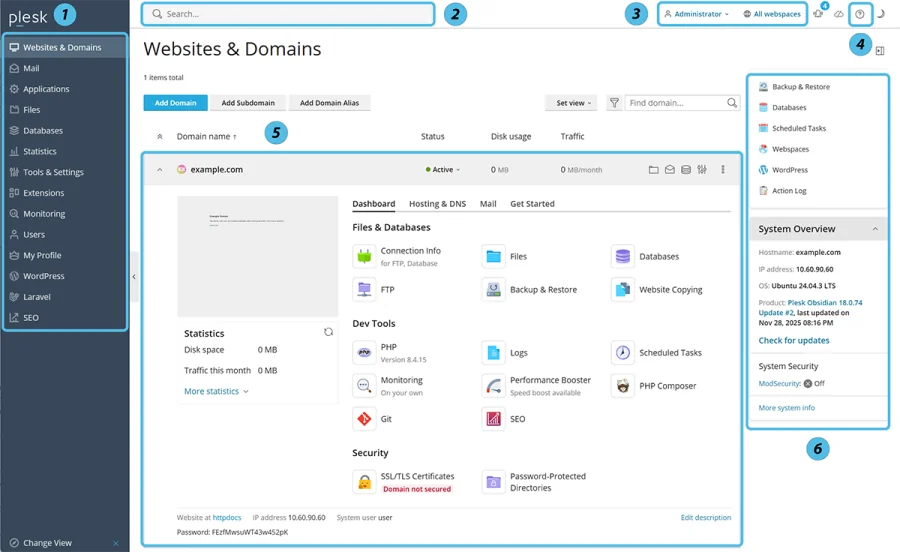
Plesk brings the everyday jobs together, so you can spend more time on your sites.

Official Plesk Websites and Domains interface showing website, file, database and SSL tools
Official Plesk interface example. Tools shown depend on your edition and installed extensions.

Websites, email and domains

Add your domains, configure hosting and manage mailboxes from one place. Web Admin Edition gives you a straightforward home for up to 10 domains.

Files, databases and SSL

Work with website files, manage databases and configure SSL certificates through the panel, with root SSH access whenever you need it.

Installed before handover

We prepare Linux, storage and your Plesk licence. You take over a self-managed server ready to configure for your websites, with Knox alongside it for the remote console and power controls.

A simpler way to run your server

Plesk for your websites.
Knox for your hardware.

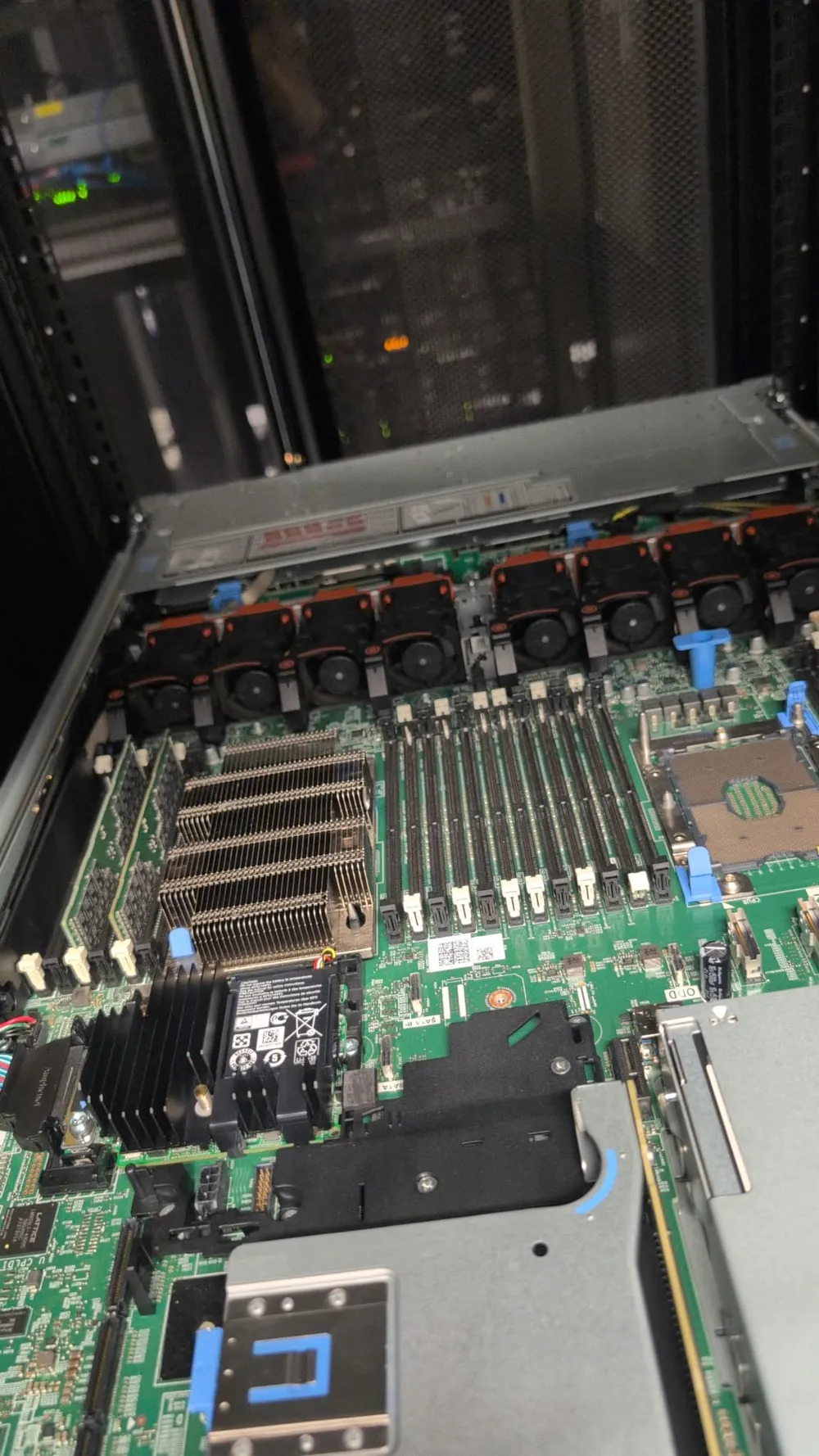
Inside an oXnames Dell PowerEdge R640 server chassis

Your day-to-day hosting, in Plesk

Create websites and mailboxes, manage databases and SSL certificates, and work with your site files through one familiar control panel.

Your server controls, in Knox

Open the remote console, view server information and use the available power controls from your oXnames account. You also retain full root access over SSH.

Installed and ready for your sites

We prepare the operating system, RAID storage and Plesk installation before handover. Your server is self-managed; talk to us if you need ongoing administration or a backup service.

Meet your dedicated control centre

Your server.
At your fingertips.

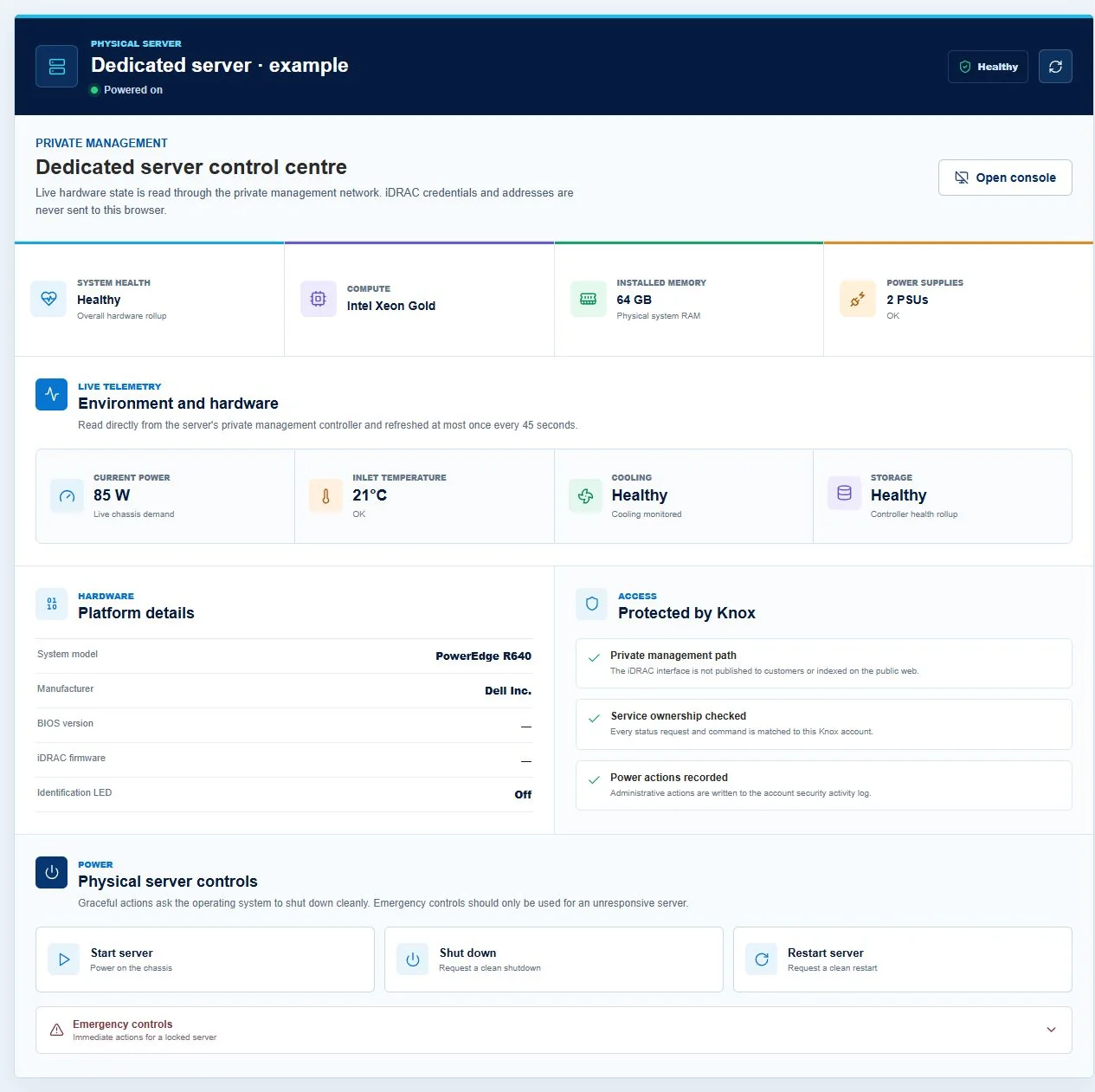
Plesk looks after your websites. Knox puts the physical server controls in your oXnames account.

Knox dedicated server control centre preview showing hardware health, telemetry, remote console and power controls
Knox control-centre preview with illustrative server readings. Select the image to enlarge.

See how your hardware is doing

Check server health, installed memory, power usage, inlet temperature, cooling and storage status from one screen.

A console, wherever you are

Open your server console from Knox when you need access beyond SSH. On enabled servers, virtual media lets you mount an installation ISO and choose a one-time boot.

Power controls in your account

Start, shut down or restart your server without a separate iDRAC login. Server access is checked against your account, and power actions are recorded.

From build to first login

How Your Dedicated Server Goes Live

A transparent 5-step engineering process backed by UK specialists who double-check every build before handing over root SSH credentials.

01

Stock Selection / Consultation

Tell us about the applications, users, storage growth and software you need. We match those requirements to an appropriate Dell platform and currently available components.

Included in setup

02

Spec Confirmation & Routing

We confirm CPU, ECC memory, drive set, RAID level, network, IP requirements, operating system and any control-panel licences in a written specification and price.

Included in setup

03

Build, RAID Setup & Diagnostics

Once approved, we assemble the agreed components, configure PERC hardware RAID and check memory, storage health, firmware and remote management.

Included in setup

04

Linux & Plesk Installation

We install the agreed Linux distribution and Plesk Web Admin Edition. Your dedicated-server licence is included in the bundle; any edition upgrades or additional services are agreed in your quote.

Included in setup

05

Credentials Handover & Migration Support

Your Plesk, SSH and Knox access details are handed over after final checks. We agree the scope of your free migration and check the moved services with you.

Included in setup

Need a different Plesk server specification?

Tell our team about your websites, databases and storage requirements. We can tailor your hardware and Plesk edition to suit.

Consult an Engineer
Frequently Asked Questions

Your Questions, Answered

Every base build includes Plesk Web Admin Edition licensed for a dedicated server, supporting up to 10 domains. The licence is included in your agreed monthly bundle price. Paid extensions are separate unless listed in your quote.

Yes. Ask for Web Pro Edition, which supports up to 30 domains, or Web Host Edition, which supports unlimited domains and reseller management. We confirm the upgraded bundle price before you order. Actual website capacity depends on the hardware and your workload.

These are self-managed dedicated servers with Linux and Plesk installed. You retain root access and responsibility for day-to-day software administration. We provide the hardware and infrastructure support described in your service terms; ongoing management can be discussed separately.

We offer free server migration, subject to reviewing the source system and agreeing the scope. Tell us about your current panel, websites, databases and email so we can check compatibility and plan the move with you.

No. RAID helps keep storage available when a drive fails, but it does not protect against deletion, compromised websites or every type of hardware failure. Keep independent backups; ask us to include a suitable backup service in your quote.

We confirm the deployment estimate with your quote. Your build is prepared and checked, including storage, operating system, Plesk and remote access, before we send your login details.
oXnames support mascot

Find the right Plesk server for your websites

Tell us how many sites you run, your current storage use and the applications you rely on. We will recommend a build and quote one monthly price including your Plesk licence.